A couple of weeks ago I was part way through an interview process at a startup, and a really interesting question came up. “How can we get teams prototypes all in one place? They are scattered across loads of apps, hosting services and local”
I’ve felt that pain, I’m sure heaps of us are living it right now within our teams too. The more frontier tooling that gets launched, the more fragmented the stuff we make becomes.
My instinct was to pick away at it to see what was possible. Within a few hours I had a working system, a platform of sorts, that allows anyone within a team to:
- Clone the prototyping repo
- Use a local build process of their choice (e.g. Codex, Claude Code et al)
- Push their prototype which then deploys
- Access it in the same online gallery/collection as all company prototypes
Extending beyond just collecting prototypes
Problem solved. Well, not quite. In the next interview they asked “But how could we also have iOS apps within this?”
Let’s just pause here for a moment. Before we arrived at the iOS question I’d already been thinking about a few other common (and lived) pain points with prototyping in teams. Yeah, you can put everyone under the same roof, but what about…
- Having access to the same mock data, data hooks, APIs, business logic
- Access to the same design system .tsx components
- Templates or page scaffolding for existing views
- Skill files for managing brand, motion, pattern rules
- Business knowledge agents to support prototyping
When I created the Phillips Auctioneers bidding simulator the core approach within the system design was to ensure we could import real auction sales, record auction sale events and then make those available for other services. Primarily so we could hand this data to a post-sale series of journeys, What does it look like to checkout after a sale?
I went on to create APIs for this data and service these up so a sale had a full journey, we then could bring the data into the business tooling to see processing flows and simulate global customer checkout views (taxes, shipping, customer support). For me, this is what turns the “looks nice” of Figma designing into the “we can actually see if it works” of prototyping. It’s data at scale through the product, not just a CSV imported into the placeholders.
This is the kinda stuff we want in prototyping. It can be scary to jump into a bigger space than your initial design needs, but you get amazing dividends later on and so do your team.
So my view of the prototyping under one roof had been geared more towards the services prototypers could use and extend.
React Native Prototyping Workflow
Back to the iOS topic. My experience with building for iOS is relatively fresh, I’ve mainly been using local builds on my phone for the last year. Stress testing out interactions, journeys and variations. In terms of wrapping my head around distribution and multiplayer prototyping – this was all new.
But, again, within a few hours the platform had:
- An iOS build that launches the platform/gallery view of journeys – so you’re only distributing one app to folks in the business, but it houses many journeys
- A React Native (this was in the mission brief), workflow for over-the-air (OTA) updates. Meaning you could open the app, see a message to refresh and within seconds pull down a team mates new prototypes
- A pool of internal TestFlight users that were automatically getting emails for new iOS updates and refreshes of app images onto their phones
- An agent guardrail to port the webapp prototype to React Native, so it gives you the first pass on the answer to “What does this look like in our app?”
Once I had this running smoothly it was time to test out bringing in prototypes from other webapp tools.
- You can keep Figma Make prototypes in sync via GitHub, add them to the same platform and keep iterating in Figma Make and local if you ask the agent to bring it down
- And the same for Lovable prototypes
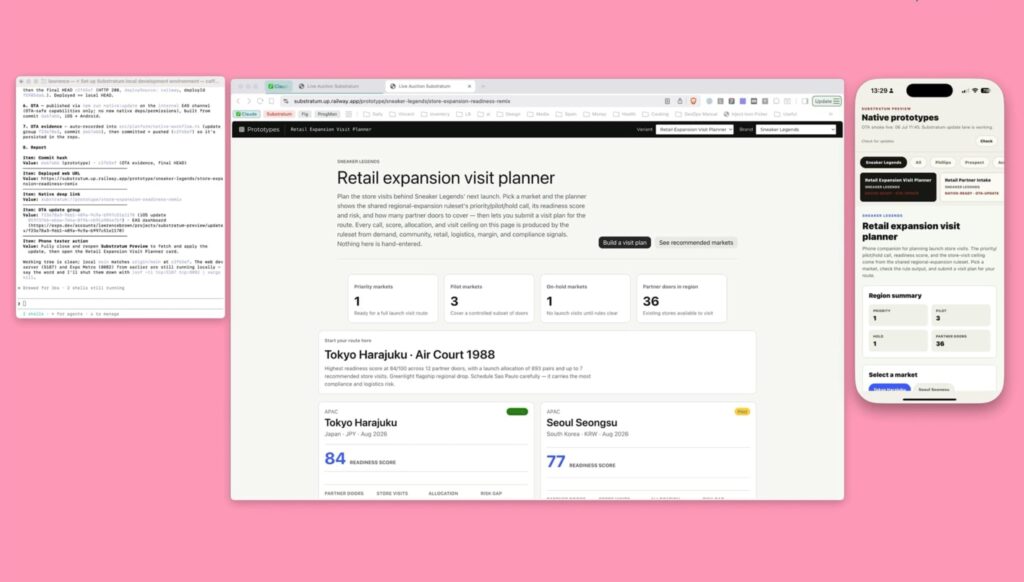
In summary, the initial build was a one repo workflow that allowed any prototyper to clone/pull, make a thing within the structure of the business, commit and distribute automatically to one web platform and React Native app.
Does this sound like something you or your team need right now? I’d be super interested to hear from you.
Is this something you’ve already built and you’d like to share what’s working or pain points, again, I’d love to hear from you. It’s a really interesting slice of design and product tooling right now.
I have a couple of repos you can experiment with. One is the full-fat platform model, it includes early versions of API cloning tools (so you could re-create a prod API to use in your tests), a design system skill to guide the Figma MCP from going wild, a data hooks service. And these are all very early works in progress that I’m running through testing and evals.
There’s also a lighter-weight repo that is just the platform distribution workflow for web, no React native in there yet.
Let me know if you’d like to have a chat, share, try some stuff out.
No doubt there will be folks reading this who have a super advanced set of tooling, or who are making their own mega versions of what I’m describing. And this is the wonderful side of the era we’re in.
How it works
- A single React platform app that imports every prototype manifest.
- A Git-backed registry instead of scattered demo links.
- Railway (cloud and deployment service) connected to main, with /health reporting the deployed commit.
- A publish guard that says commit, push, or stop.
- A ship script that runs checks, commits, pushes, waits for Railway, and prints a receipt.
- An Expo iOS (React Native framework) preview app distributed once through TestFlight.
- EAS (cloud tools at Expo) update for over the air (OTA) prototype changes.
- Native registry metadata so phone prototypes stay aligned with web prototypes.
There are different ways to approach this for sure. Especially if you’re a deployment expert or work at a company with access to those skills. I’m betting some folks have rolled their own deployment services that are working some delightful magic.
Where is this going next?
I’d love to see this put through its paces in a team. No doubt there are creases to iron out and interesting infrastructure problems to integrate with. I don’t think it’s a platform for sale, I’m still passionate about recipes for agents – I believe anyone would likely get more value from autonomy of making and owning something shaped like this. Saying that, there might be teams who just need it to solve the problem.
Roadmap tasks:
- Roll out prototypes that use the cloning API feature
- Scale the design system agent guardrails, skill and context docs, allowing for a better starting point for any Figma MCP work – this needs a big test data set
- Hook in a business knowledge system (graph/docs) so prototypes can be guided with agents to meet intel from the business
- Agent guides for beginners, make sure the prompting paralysis is easily supported if you’re new to working with agents
As I mentioned above, I’d love to hear from you if you’re interested to learn more, try this out, you want to show and tell what you’ve been working on in this space.
Also, I’m still on the hunt for my next job, so if this piqued your interest and you’re hiring – please do drop me a message – email@lawrencebrown.eu